
Accessing Cloudfront stream with VideoJS and server-side signed cookies
Today's post is a continuation of what I wrote yesterday about securing Cloudfront stream with signed cookie. I encourage you to open this post especially to look at the UML diagram. There are some things you need to keep in mind to access a stream from the client's browser.
1. Include cookies with the request
When the VideoJS withCredentials property is set to true, all XHR requests for playlist and segments would have withCredentials set to true as well. I refer you to this post if you aren't sure why it is required.
var player = videojs('player', {
            html5: {vhs: {withCredentials: true}}
        });
2. CORS settings
Now on the AWS side:
- Set CORS configuration for your S3 bucket
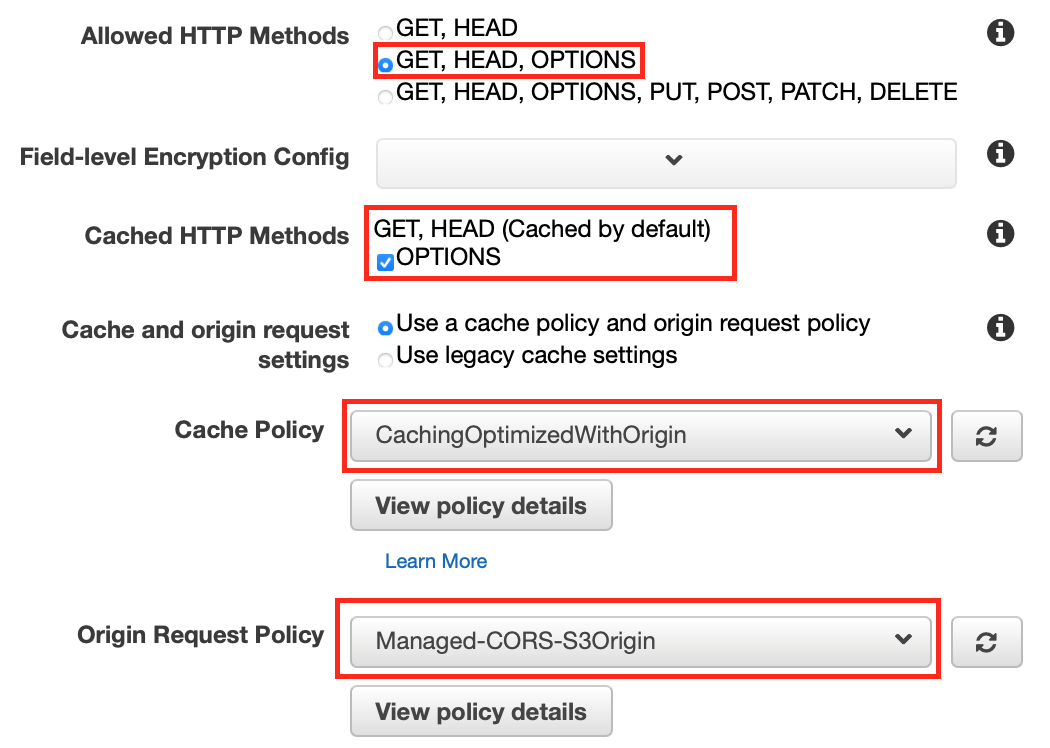
[ { "AllowedHeaders": [ "*" ], "AllowedMethods": [ "GET", "HEAD" ], "AllowedOrigins": [ "your.app.domain" ], "ExposeHeaders": [], "MaxAgeSeconds": 3000 } ] - Change the default cache behavior of your CloudFront instance. Enable OPTIONS as cached HTTP method. Choose Cache Policy and Origin Request Policy that both have origin header whitelisted.
3. Refresh cookies regularly
You must ensure that the client's browser always has a valid cookie when content is being streamed. For this, I regularly hit the backend to get a new one. The interval depends on cookies expiration time and cookies DateLessThan statement.
function reportProgress(uri, progress, async = true) {
    let s3Key = uri.substring(uri.lastIndexOf("/") + 1, uri.lastIndexOf("."));
    $.ajax({
        url: "/chapters/progress",
        type: "POST",
        async: async,
        data: {progress: progress, "s3_key": s3Key},
    });
}

player.on('beforeplaylistitem', (event, item) => {
    let uri = item.sources[0].src;
    reportProgress(uri, 0, false);
})

player.setInterval(function () {
    let uri = player.currentSource().src;
    reportProgress(uri, player.currentTime());
}, interval);
Comments
Join the discussionNo comments yet. Be the first to comment.
Audiobook streaming platform on AWS stack and Ruby on Rails
In this series I discuss the issues that I encountered while working on audiobook streaming platform.